
Docker Containerization: Why It Matters and How It Works
In modern software development, speed, scalability, and consistency are critical. Organizations are increasingly adopting containerization to streamline development and deployment processes. This docker containerization overview highlights how one of the most widely used technologies Docker has transformed how developers build, package and deploy applications across different environments.
Understanding how docker containerization works is essential for teams aiming to build scalable and efficient systems.
What is Docker Containerization?
Docker containerization is a lightweight virtualization technology that allows developers to package an application along with all its dependencies libraries, runtime, configuration files and system tools into a single unit called a container.
A container ensures that the application runs consistently across different environments, whether it is a developer’s laptop, a testing server or a production cloud environment.
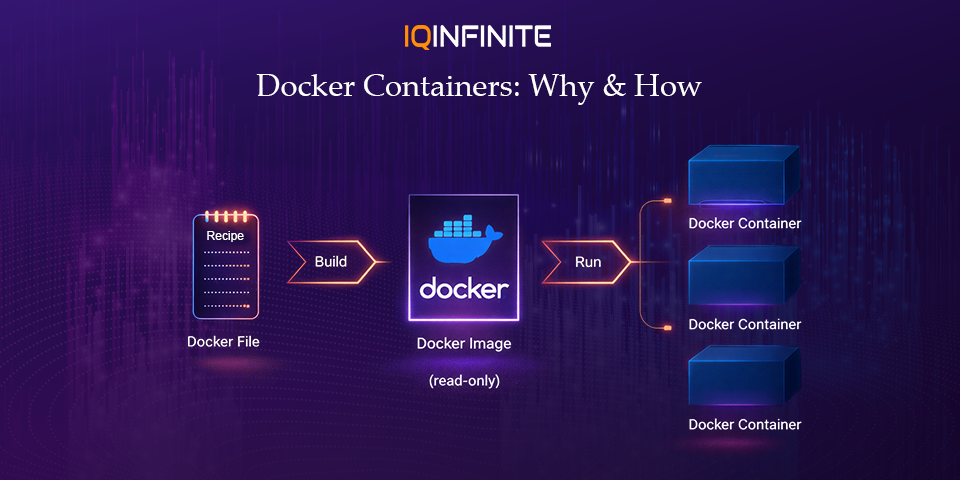
If you're wondering how to do containerization in docker, the process typically involves creating a Dockerfile, building an image and running it as a container. This makes application deployment faster, repeatable and reliable.
To better understand the architecture, many developers refer to a docker containerization diagram, which visually explains how containers interact with the host system and Docker engine.
A container ensures that the application runs consistently across different environments, whether it is a developer’s laptop, a testing server or a production cloud environment.
If you're wondering how to do containerization in docker, the process typically involves creating a Dockerfile, building an image and running it as a container. This makes application deployment faster, repeatable and reliable.
To better understand the architecture, many developers refer to a docker containerization diagram, which visually explains how containers interact with the host system and Docker engine.
Why Docker Matters in Modern Development
Containerization has become a cornerstone of cloud-native development, DevOps and microservices architecture. Docker plays a central role in enabling these modern development practices.
1. Consistent Development Environments
One of the biggest challenges developers faces is the classic problem: “It works on my machine.”
Docker eliminates this issue by packaging applications with all their dependencies. This ensures the application behaves the same across development, testing and production environments.
Docker eliminates this issue by packaging applications with all their dependencies. This ensures the application behaves the same across development, testing and production environments.
2. Faster Application Deployment
Containers start in seconds because they do not require booting an entire operating system like virtual machines. This speed enables rapid deployment cycles and supports continuous integration and continuous deployment (CI/CD).
As companies move toward DevOps practices, Docker helps automate build, test and deployment pipelines.
As companies move toward DevOps practices, Docker helps automate build, test and deployment pipelines.
3. Improved Scalability
Docker containers are lightweight and can be easily scaled horizontally. When an application experiences increased traffic, additional containers can be launched quickly to handle the load.
Container orchestration platforms such as Kubernetes are commonly used alongside Docker to automate scaling, load balancing and management of containers.
Container orchestration platforms such as Kubernetes are commonly used alongside Docker to automate scaling, load balancing and management of containers.
4. Efficient Resource Utilization
Because containers share the host OS kernel, they require fewer system resources than traditional virtual machines. This allows organizations to run more applications on the same infrastructure.
This efficiency is especially valuable in cloud environments, where reducing compute usage directly lowers costs.
This efficiency is especially valuable in cloud environments, where reducing compute usage directly lowers costs.
5. Supports Microservices Architecture
Modern applications are increasingly built using microservices, where each component of an application runs as an independent service.
Docker containers provide the perfect environment for microservices because each service can run in its own isolated container while still communicating with other services.
Docker containers provide the perfect environment for microservices because each service can run in its own isolated container while still communicating with other services.
How Docker Works: Understanding the Core Components of Containerization
To fully understand Docker containerization, it's important to explore the core components that make Docker work. These components work together to create, manage and run containers efficiently across different environments.
1. Docker Engine
The Docker Engine is the core runtime that powers Docker containers. It acts as the platform responsible for building, running and managing containers on a system.
The Docker Engine consists of three main parts:
Docker Daemon (dockerd)
The Docker Daemon runs in the background and manages Docker objects such as containers, images, networks and volumes. It listens for Docker API requests and processes them.
Docker CLI (Command Line Interface)
The Docker CLI allows developers to interact with Docker using commands such as:
The Docker Engine consists of three main parts:
Docker Daemon (dockerd)
The Docker Daemon runs in the background and manages Docker objects such as containers, images, networks and volumes. It listens for Docker API requests and processes them.
Docker CLI (Command Line Interface)
The Docker CLI allows developers to interact with Docker using commands such as:
- docker build
- docker run
- docker pull
- docker push
Through the CLI, developers can build images, start containers and manage Docker resources.
REST API
Docker also provides a REST API that allows integration with automation tools, CI/CD pipelines and third-party platforms.
REST API
Docker also provides a REST API that allows integration with automation tools, CI/CD pipelines and third-party platforms.
2. Docker Images
A Docker Image is a read-only template used to create containers. It contains everything required to run an application, including:
- Application source code
- Runtime environment
- Libraries and dependencies
- Environment variables
- Configuration files
Images are built using a Dockerfile, which defines a set of instructions for assembling the image.
Example Dockerfile
Example Dockerfile
FROM node:20
WORKDIR /app
COPY package.json .
RUN npm install
COPY . .
CMD [\"npm\", \"start\"]
This Dockerfile performs the following actions:
1. Uses the Node.js 20 base image
2. Sets the working directory inside the container
3. Copies the dependency file
4. Installs required packages
5. Copies the application code
6. Starts the application when the container runs
Once built, this image can be used to launch multiple identical containers.
1. Uses the Node.js 20 base image
2. Sets the working directory inside the container
3. Copies the dependency file
4. Installs required packages
5. Copies the application code
6. Starts the application when the container runs
Once built, this image can be used to launch multiple identical containers.
3. Docker Containers
A Docker Container is a running instance of a Docker image.
Containers package an application along with its dependencies and run it in an isolated environment.
Key characteristics of containers include:
Containers package an application along with its dependencies and run it in an isolated environment.
Key characteristics of containers include:
- Lightweight compared to traditional virtual machines
- Fast startup times (often within seconds)
- Isolation from other containers and host processes
- Consistency across development, testing, and production environments
Multiple containers can be created from the same image, allowing applications to scale easily.
4. Docker Registry
A Docker Registry is a storage and distribution system for Docker images.
Developers can store, share and manage container images using registries such as:
• Public registries (like Docker Hub)
• Private company registries
• Cloud container registries
Common registry actions include:
Developers can store, share and manage container images using registries such as:
• Public registries (like Docker Hub)
• Private company registries
• Cloud container registries
Common registry actions include:
- Pulling images to run containers
- Pushing images after building them
- Versioning images for different application releases
Registries make it easier for teams to distribute and deploy applications across different environments.
Docker Workflow in Practice
A typical Docker development workflow looks like this:
- Write the application code
- Create a Dockerfile defining the environment
- Build a Docker image
- Run a container from the image
- Push the image to a container registry
- Deploy containers to servers or cloud infrastructure
This workflow ensures that the application runs consistently across different systems and environments.
Docker in Today’s Technology Landscape (2026 Trends)
Docker continues to play a crucial role in modern cloud infrastructure and DevOps ecosystems. Several major trends highlight its importance in 2026.
Cloud-Native Development
Docker containers are a foundational element of cloud-native architectures. They allow applications to run consistently across cloud providers, including hybrid and multi-cloud environments.
Containers also enable developers to build microservices-based applications, where each service runs independently inside its own container.
Containers also enable developers to build microservices-based applications, where each service runs independently inside its own container.
Kubernetes Integration
Most enterprise-scale container deployments rely on container orchestration platforms.
Docker images are commonly used with orchestration tools like Kubernetes, which manage:
Docker images are commonly used with orchestration tools like Kubernetes, which manage:
- Container scheduling
- Auto-scaling
- Service discovery
- Load balancing
- Self-healing systems
This combination enables organizations to run highly scalable distributed systems.
AI and Machine Learning Workloads
Docker is increasingly used to package machine learning models and AI workloads.
Containers help data scientists create reproducible environments, ensuring that models behave the same way across development, testing and production systems.
This is especially valuable when working with complex dependencies such as GPU libraries and deep learning frameworks.
Containers help data scientists create reproducible environments, ensuring that models behave the same way across development, testing and production systems.
This is especially valuable when working with complex dependencies such as GPU libraries and deep learning frameworks.
Edge Computing
With the growth of edge computing, containers are now being deployed closer to users and devices.
Docker containers allow lightweight services to run on:
Docker containers allow lightweight services to run on:
- IoT devices
- Edge gateways
- Distributed infrastructure nodes
This improves application performance by reducing latency and bringing computation closer to the data source.
DevSecOps and Container Security
Security has become a critical part of the container lifecycle.
Modern DevSecOps pipelines now include tools that:
Modern DevSecOps pipelines now include tools that:
- Scan container images for vulnerabilities
- Detect outdated dependencies
- Enforce secure container configurations
- Monitor runtime container behavior
These practices help organizations maintain secure and compliant container environments.
Advantages of Docker Containerization
Docker offers several benefits that make it a popular choice for developers and organizations worldwide.
- Faster Application Startup: Containers start almost instantly compared to traditional virtual machines.
- Environment Consistency: Applications run the same way in development, testing and production environments.
- Portability: Containers can run on any system that supports Docker, including cloud platforms and on-premises servers.
- Efficient Resource Usage: Containers share the host OS kernel, making them far more lightweight than virtual machines.
- Simplified Scaling: Containers can be easily replicated to handle increasing workloads.
- Improved Collaboration: Docker bridges the gap between development and operations teams, supporting modern DevOps workflows.
Challenges and Considerations
While Docker provides many advantages, there are still challenges teams must address.
- Container Security: Misconfigured containers or outdated images can introduce vulnerabilities.
- Monitoring and Logging: Observing containerized applications requires specialized tools.
- Container Orchestration Complexity: Managing hundreds or thousands of containers requires orchestration systems such as Kubernetes.
- Learning Curve: Teams new to containerization may need time to adapt to Docker workflows and best practices.
Fortunately, modern DevOps tools and platforms help mitigate these challenges.
Conclusion
Docker containerization has become a foundational technology in modern software development.
By packaging applications and their dependencies into lightweight, portable containers, Docker enables developers to build systems that are consistent, scalable and efficient much like how platforms such as PlayStation Plus deliver seamless and reliable digital experiences to users.
As organizations continue adopting cloud-native architectures, microservices and DevOps practices, Docker remains a critical tool for delivering reliable applications faster.
For developers and IT teams looking to modernize their infrastructure, mastering Docker containerization is an essential step toward ,b>agile, scalable and future-ready software delivery.
By packaging applications and their dependencies into lightweight, portable containers, Docker enables developers to build systems that are consistent, scalable and efficient much like how platforms such as PlayStation Plus deliver seamless and reliable digital experiences to users.
As organizations continue adopting cloud-native architectures, microservices and DevOps practices, Docker remains a critical tool for delivering reliable applications faster.
For developers and IT teams looking to modernize their infrastructure, mastering Docker containerization is an essential step toward ,b>agile, scalable and future-ready software delivery.